The Transformative Power of Artificial Intelligence: Shaping the Future In the realm of technological advancements, few innovations have captured the world's imagination as much as Artificial Intelligence (AI). From science fiction to reality, AI has become a powerful force driving transformative changes across various industries and sectors. Its significance cannot be overstated, as it has the potential to reshape the way we live, work, and interact with our surroundings. In this blog, we delve into the importance of AI and explore the profound impact it has on our society. 1. Enhancing Efficiency and Productivity: One of the most apparent benefits of AI is its ability to boost efficiency and productivity across industries. By automating repetitive tasks, AI liberates human resources to focus on more complex and creative endeavors. Businesses can streamline processes, optimize resource allocation, and make data-driven decisions faster, resulting in cost savings and increased com...
Explore repository
There is a Git repository named food-scripts consisting of a couple of food-related Python scripts.
Navigate to the repository using the following command:
cd ~/food-scripts
Now, list the files using the ls command. There are three files named favorite_foods.log, food_count.py, and food_question.py.

Let's explore each file. Use the cat command to view each file.
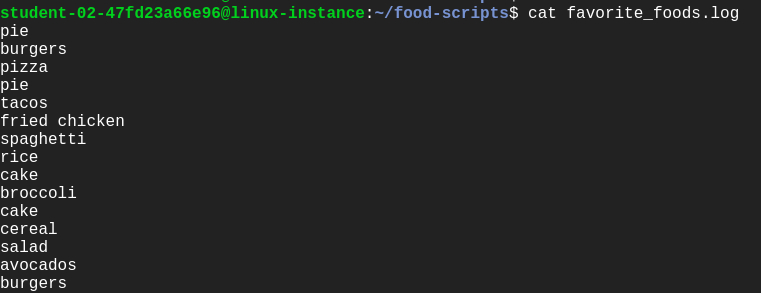
favorite_foods.log: This file consists of a list of food items. You can view it using the following command:
cat favorite_foods.log
Output:
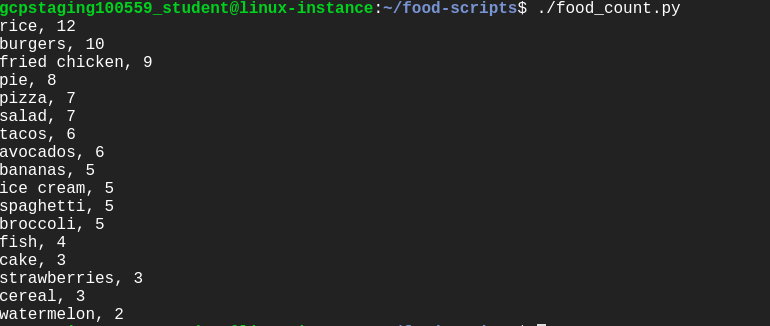
- food_count.py: This script returns a list of each food and the number of times the food appeared in the
favorite_foods.logfile.
Let's execute the script food_count.py:
./food_count.py
Output:
- food_question.py: This prints a list of foods and prompts the user to enter one of those foods as their favorite. It then returns an answer of how many others in the list like that same food.
Run the following command to see the output of food_question.py script:
./food_question.py
Output:

Uh oh , this gives us an error. One of your colleagues reports that this script was working fine until the most recent commit. We'll be fixing this error later during the lab.
Understanding the repository
Let's use the following Git operations to understand the workflow of the repository:
- git status
- git log
- git branch
Git status: This displays paths that have differences between the index file and the current HEAD commit; paths that have differences between the working tree and the index file; and paths in the working tree that are not tracked by Git. You can view the status of the working tree using the command: [git status]
git status
You can now view the status of the working tree.
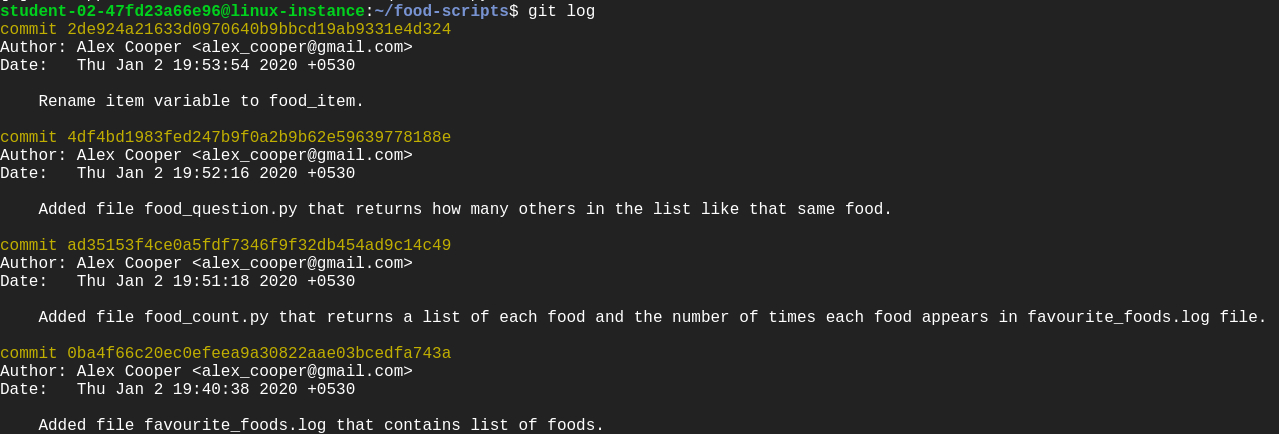
Git log: This lists the commits done in the repository in reverse chronological order; that is, the most recent commits show up first. This command lists each commit with its SHA-1 checksum, the author's name and email, date, and the commit message.
You can see logs by using the following command:
git log
Output:
Enter q to exit.
Git branch: Branches are a part of the everyday development process on the master branch. Git branches effectively function as a pointer to a snapshot of your changes. When you want to add a new feature or fix a bug, no matter how big or small, you spawn a new branch to encapsulate your changes. This makes it difficult for unstable code to get merged into the main codebase.
Configure Git
Before we move forward with the lab, let's configure Git. Git uses a username to associate commits with an identity. It does this by using the git config command. Set the Git username with the following command:
git config user.name "Name"
Replace Name with your name. Any future commits you push to GitHub from the command line will now be represented by this name. You can even use git config to change the name associated with your Git commits. This will only affect future commits and won't change the name used for past commits.
Let's set your email address to associate them with your Git commits.
git config user.email "user@example.com"
Replace user@example.com with your email-id. Any future commits you now push to GitHub will be associated with this email address. You can also use git config to change the user email associated with your Git commits.
Add a new feature
In this section, we'll be modifying the repository to add a new feature, without affecting the current iteration. This new feature is designed to improve the food count (from the file food_count.py) output. So, create a branch named improve-output using the following command:
git branch improve-output
Move to the improve-output branch from the master branch.
git checkout improve-output
Here, you can modify the script file without disturbing the existing code. Once modified and tested, you can update the master branch with a working code.
Now, open food_count.py in the nano editor using the following command:
nano food_count.py
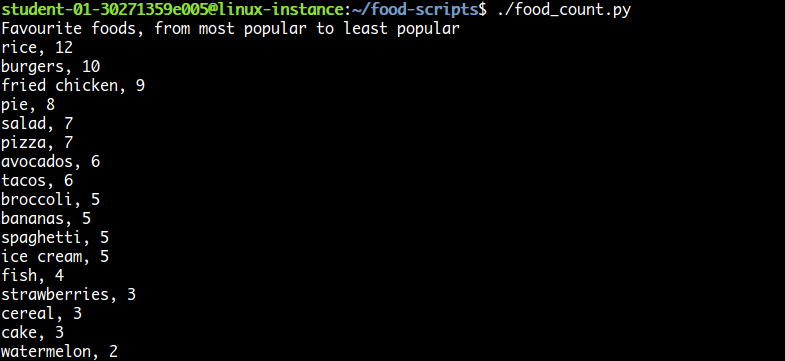
Add the line below before printing for loop in the food_count.py script:
print("Favourite foods, from most popular to least popular")
Save the file by pressing Ctrl-o, the Enter key, and Ctrl-x. Then run the script food_count.py again to see the output:
./food_count.py
Output:
After running the food_count.py script successfully, commit the changes from the improve-output branch by adding this script to the staging area using the following command:
git add food_count.py
Now, commit the changes you've done in the improve-output branch.
git commit -m "Adding a line in the output describing the utility of food_count.py script"
Output:

Nice and good article. It is very useful for me to learn and understand easily. Thanks for sharing
ReplyDeleteAWS Certification Training
AWS Training
dilatio-zu Robin Brown https://wakelet.com/wake/n3nz_SR9tQen3IXW70t5l
ReplyDeletezievatycatch
Eskişehir
ReplyDeleteAdana
Sivas
Kayseri
Samsun
23İJOİ
kırıkkale evden eve nakliyat
ReplyDeleteamasya evden eve nakliyat
kayseri evden eve nakliyat
istanbul evden eve nakliyat
sakarya evden eve nakliyat
2LL4
1894E
ReplyDeleteYozgat Şehirler Arası Nakliyat
Ünye Mutfak Dolabı
Çankırı Evden Eve Nakliyat
Burdur Lojistik
Sivas Parça Eşya Taşıma
Kırşehir Şehir İçi Nakliyat
Denizli Parça Eşya Taşıma
Eskişehir Şehir İçi Nakliyat
Niğde Parça Eşya Taşıma
1F240
ReplyDeleteBayburt Lojistik
Adıyaman Evden Eve Nakliyat
Kilis Evden Eve Nakliyat
Hatay Evden Eve Nakliyat
Elazığ Şehirler Arası Nakliyat
Manisa Evden Eve Nakliyat
Bitlis Şehirler Arası Nakliyat
Denizli Lojistik
Muş Evden Eve Nakliyat
0E856
ReplyDeleteÇerkezköy Koltuk Kaplama
Kırıkkale Evden Eve Nakliyat
Dxgm Coin Hangi Borsada
Samsun Parça Eşya Taşıma
Xcn Coin Hangi Borsada
Sakarya Lojistik
Hexa Coin Hangi Borsada
Hotbit Güvenilir mi
Yozgat Şehirler Arası Nakliyat
6A4AA
ReplyDeletehttps://referanskodunedir.com.tr/
88C68
ReplyDeleteCoin Kazanma
Bitcoin Çıkarma Siteleri
Coin Kazma
Coin Madenciliği Siteleri
Bitcoin Mining Nasıl Yapılır
Coin Üretme
Kripto Para Üretme
Kripto Para Nasıl Kazılır
Bitcoin Nasıl Oynanır
74A37
ReplyDeleteResimli Magnet
6E27D
ReplyDeletebinance referans kodu
binance referans kodu
resimli magnet
binance referans kodu
binance referans kodu
resimli magnet
referans kimliği nedir
resimli magnet
referans kimliği nedir
126F6
ReplyDeletediyarbakır bedava sohbet
kilis canlı sohbet ücretsiz
bilecik yabancı görüntülü sohbet siteleri
görüntülü sohbet odaları
antalya muhabbet sohbet
canli sohbet chat
tunceli mobil sohbet sitesi
muğla canlı sohbet odası
bartın bedava görüntülü sohbet sitesi
B8698
ReplyDeleteen iyi görüntülü sohbet uygulaması
sivas sohbet
ücretsiz sohbet uygulamaları
yalova en iyi görüntülü sohbet uygulamaları
niğde canlı sohbet uygulamaları
kırklareli telefonda kızlarla sohbet
Eskişehir Yabancı Görüntülü Sohbet Siteleri
Eskişehir En İyi Ücretsiz Görüntülü Sohbet Siteleri
rastgele sohbet uygulaması
FD48C
ReplyDeleteisparta sohbet muhabbet
çanakkale telefonda kadınlarla sohbet
kırşehir yabancı görüntülü sohbet
kütahya sesli görüntülü sohbet
kocaeli yabancı görüntülü sohbet siteleri
Sivas Mobil Sesli Sohbet
canlı sohbet sitesi
Ordu Telefonda Canlı Sohbet
siirt ücretsiz sohbet uygulaması
9FEAD
ReplyDeleteKocaeli Görüntülü Sohbet
Ardahan Telefonda Görüntülü Sohbet
rastgele sohbet uygulaması
bedava görüntülü sohbet sitesi
kars sohbet uygulamaları
Bilecik Mobil Sohbet Chat
konya görüntülü sohbet siteleri ücretsiz
rastgele görüntülü sohbet uygulamaları
mardin sesli görüntülü sohbet
70FE3
ReplyDeletenevşehir parasız görüntülü sohbet uygulamaları
ucretsiz sohbet
telefonda kızlarla sohbet
izmir seslı sohbet sıtelerı
gümüşhane rastgele görüntülü sohbet
bedava sohbet chat odaları
kars chat sohbet
manisa canlı sohbet odaları
Kastamonu Görüntülü Sohbet Kadınlarla
47C28
ReplyDeleteDüzce Ücretsiz Sohbet Uygulaması
yabancı görüntülü sohbet uygulamaları
ücretsiz sohbet uygulamaları
canlı görüntülü sohbet uygulamaları
görüntülü canlı sohbet
antep sohbet
ücretsiz görüntülü sohbet
Sinop Telefonda Görüntülü Sohbet
adıyaman mobil sohbet chat
7DC81
ReplyDeleteLuffy Coin Hangi Borsada
Binance Referans Kodu
Referans Kimliği Nedir
Facebook Grup Üyesi Hilesi
Okex Borsası Güvenilir mi
Binance Komisyon Ne Kadar
Twitter Takipçi Satın Al
Trovo Takipçi Hilesi
Twitch İzlenme Hilesi
CF70A
ReplyDeleteBitcoin Kazanma
Binance Referans Kodu
Floki Coin Hangi Borsada
Kwai Takipçi Satın Al
Lovely Coin Hangi Borsada
Dlive Takipçi Satın Al
Spotify Takipçi Satın Al
Big Wolf Coin Hangi Borsada
Linkedin Takipçi Satın Al
37267
ReplyDeleteCoin Nasıl Çıkarılır
Youtube Beğeni Hilesi
Binance Madenciliği Nedir
Alyattes Coin Hangi Borsada
Clysterum Coin Hangi Borsada
Görüntülü Sohbet Parasız
Telegram Abone Satın Al
Sonm Coin Hangi Borsada
Dxgm Coin Hangi Borsada
97357
ReplyDeletetrezor suite
solflare
roninchain
dextools
defilama
ellipal
onekey
metamask
layerzero
A3B25
ReplyDeletetoptan sabun
poloniex
bitget
en iyi kripto grupları telegram
rastgele canlı sohbet
bitexen
telegram kripto kanalları
btcturk
bitget
2ADDB
ReplyDeletepapaya meyvesi
btcturk
bitcoin nasıl kazanılır
telegram kripto
okex
ilk kripto borsası
https://kapinagelsin.com.tr/
toptan sabun
okex
dcsdfcsfdggfdgf
ReplyDeleteتصليح افران جدة
A45643D7A7
ReplyDeletetakipci satin al
7196699E27
ReplyDeletetakipçi satın al ucuz
A938AB8BF9
ReplyDeletegerçek takipçi
ABBC5EAFD7
ReplyDeletetiktok takipçi kasma
6B513488F5
ReplyDeleteÜcretsiz Coin Kazanma
237E953E02
ReplyDeletetiktok takipçi kasma